
Copying a matter creates a duplicate that includes all folders, documents, and briefs from the original. The original matter remains intact. This is useful when you need to share a modified version of a matter with specific external parties, such as Expert Witnesses or Consultants.
Copying a matter #
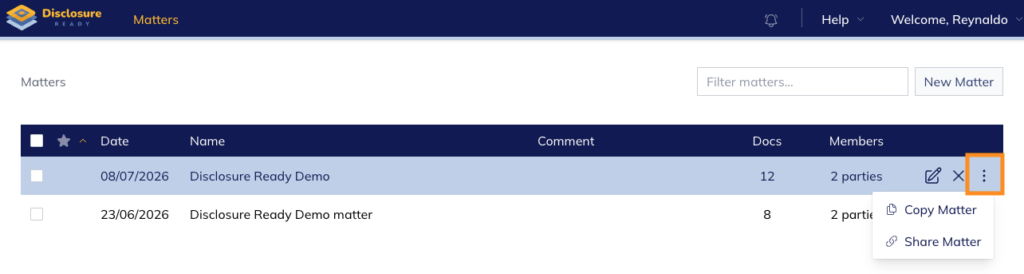
- From your Matters list, click the three dots on the right-hand side of the matter.
- Select Copy Matter
- Select the recipient:
- Copy to myself — creates a copy in your own account
- Copy to someone else — sends the copy to another user
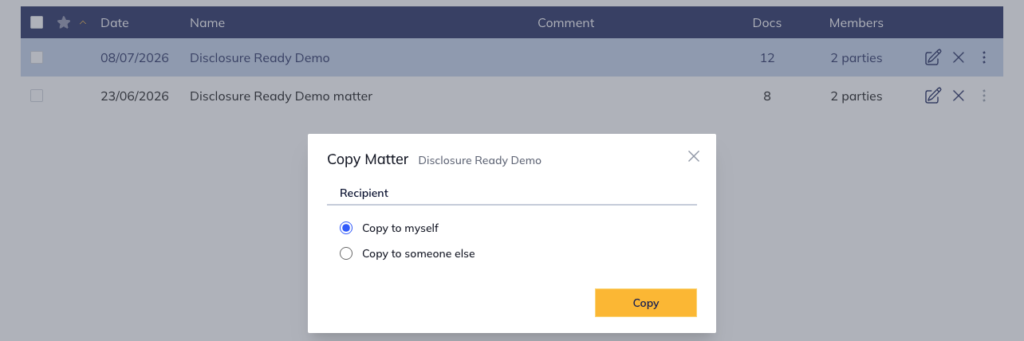
- Click Copy – the matter can be copied to the user or to someone else
Note: Once copied, the matter can be updated as needed — including content, parties, and settings — without affecting the original.
For further information or assistance, please do not hesitate to reach out to our dedicated Support Team via support@legalready.ai or +61 3 9020 4456.