
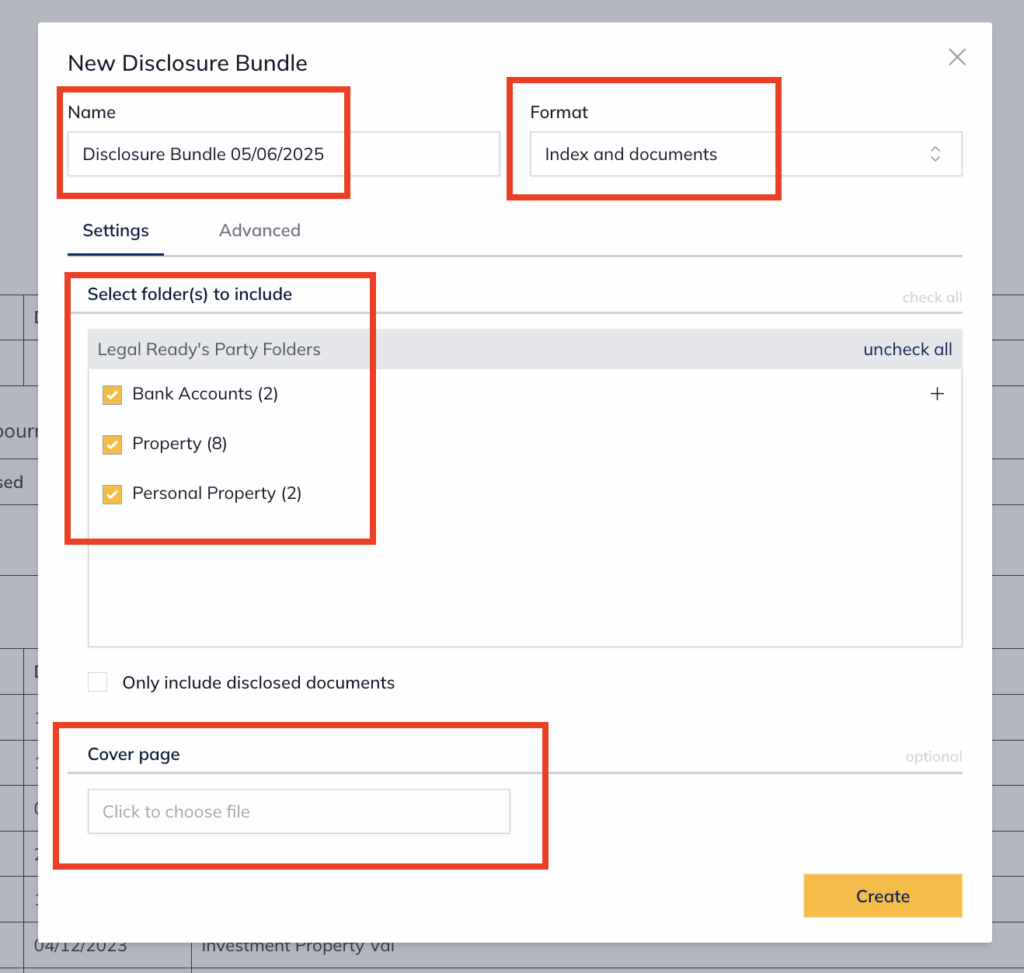
When creating a Disclosure Bundle, you have two tabs of options — Settings and Advanced.
Settings tab
The Settings tab allows you to configure:
- Name — update the name of the Disclosure Bundle
- Format — select what to include (e.g. Index and documents)
- Select folder(s) to include — choose which folders to include in the bundle
- Only include disclosed documents — check this box to limit the bundle to disclosed documents only
- Cover page — optionally upload a cover page file
Advanced tab
The Advanced tab allows you to configure:
- Index style — options include Blank page after index and Hide page number column
- Page after index — optionally upload a file to insert after the index
- Pagination — configure how pages are numbered, including:
- Style (Repaginate bottom-centre of the page, bottom-right, top-left, top-right, or Do not repaginate)
- Tabbed (double-sided printing)
- Show total pages (PAGE of TOTAL)
- Paginate documents only

For further information or assistance, please do not hesitate to reach out to our dedicated Support Team via support@legalready.ai or +61 3 9020 4456.