
This article explains how to display both the document page number and the court book page number on the same page at the same time.
In court, you may need to review a document with a witness — such as an Affidavit or Expert Report — while also directing the Judge to the correct page of the Brief/Court Book. Dual page numbering allows you to see both page numbers simultaneously.
Enabling dual page numbering
- Open any document in the matter
- Select the Paginate option from the document viewer toolbar.
- Select the Disclosure Bundle you want the pagination to align with
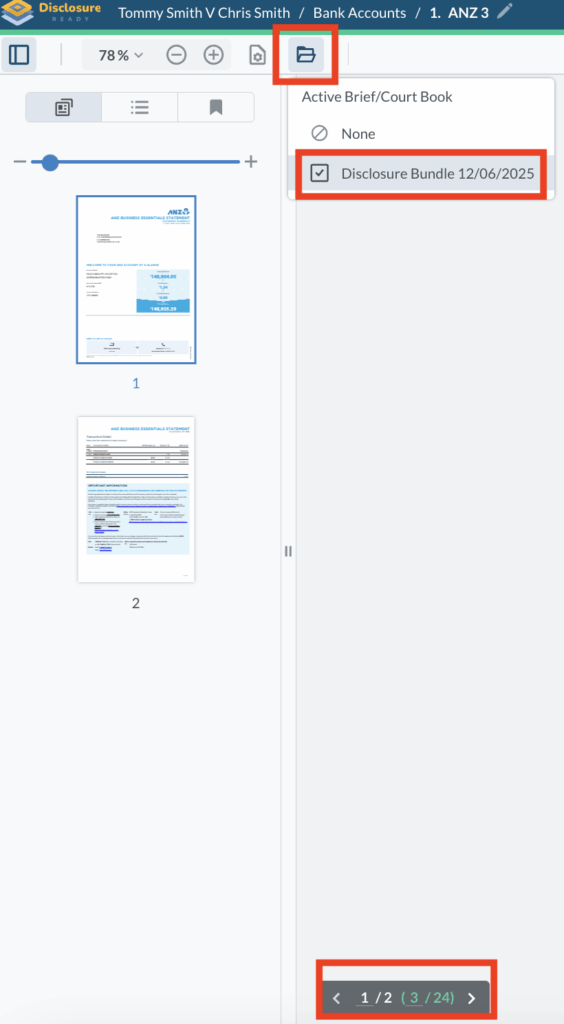
You will now see two page numbers on the page — the document page number and the Disclosure Bundle page number.
Any other documents you open that are contained in the same Disclosure Bundle will also show this dual page numbering.
Note: This setting is local to you. Unless other members of your matter also turn on this option, they will only see the standard pagination.
For further information or assistance, please do not hesitate to reach out to our dedicated Support Team via support@legalready.ai or +61 3 9020 4456.