
Disclosure Ready allows you to control how documents are ordered within a matter and inside individual folders. Sorting helps you organise documents in a way that supports your workflow and makes it easier to locate specific files.
There are four sorting options available:
- Manual / User-defined — documents appear in the order defined by the user
- Field: Date — documents are ordered chronologically by document date
- Field: Disclosed — documents are grouped by disclosure status
- Field: Document name — documents are ordered alphabetically by document name
Sorting documents at the matter level #
The matter-level sorting option sets the default order for documents across the entire matter.
- Open the matter and go to the Setup tab
- Select Settings from the left-hand panel
- Under Document sorting, select your preferred option from the Default sort by attribute dropdown
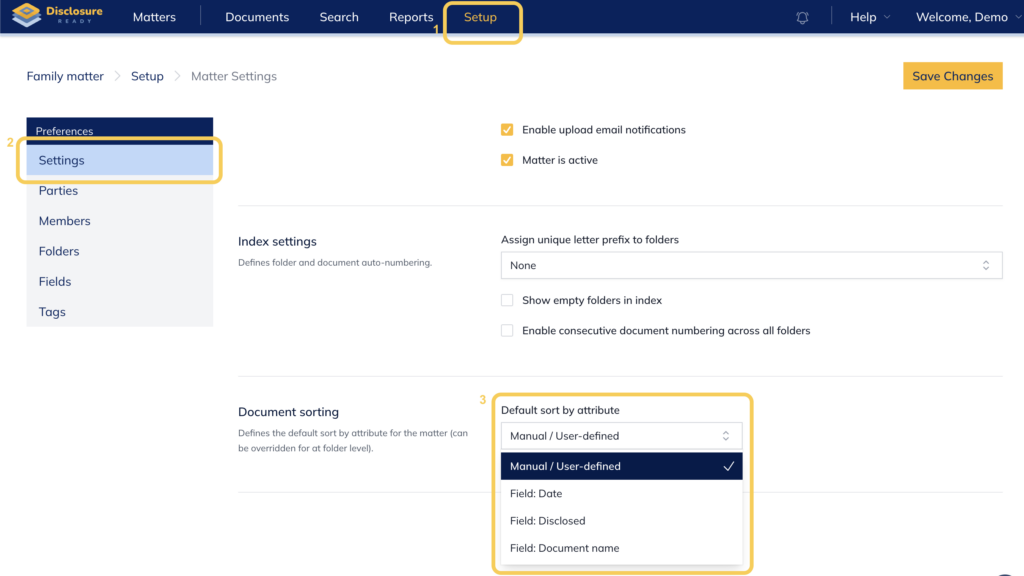
Note: For Field: Date and Field: Document name, you can also enable Sort in reverse order to reverse the default direction (e.g. newest to oldest for dates, or Z–A for document names).
Sorting documents within folders #
Individual folders can have their own sorting order, separate from the matter-level setting. This lets you organise specific folders differently depending on the type of documents they contain.
To set sorting for a specific folder:
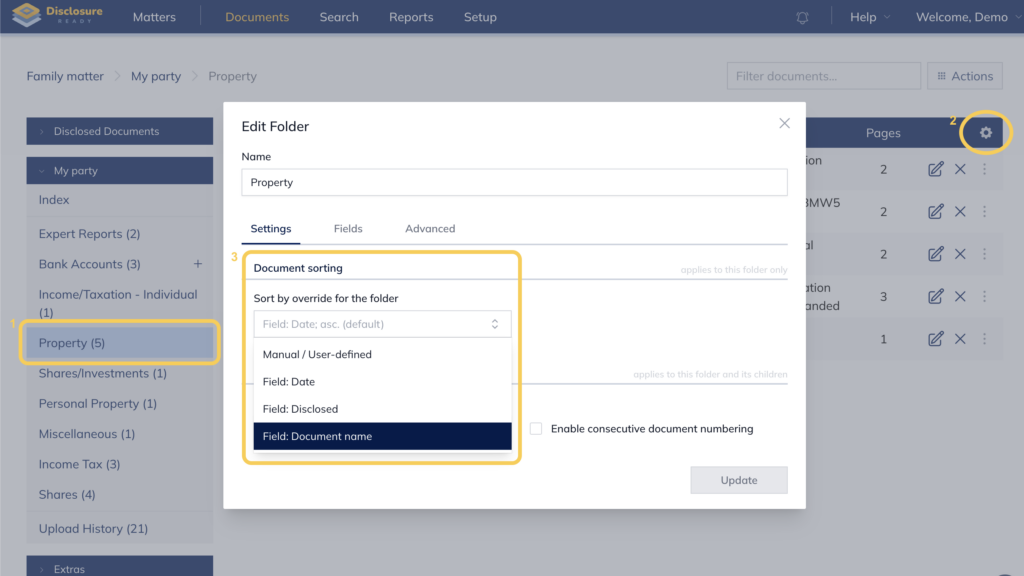
- Open the folder within the matter
- Click the Cog icon in the top right corner of the folder
- Under Document sorting, select Sort by override for the folder and choose your preferred option
Combining matter and folder sorting #
You can set the entire matter to sort by Field: Date for a chronological overview, while applying Field: Document name or Manual / User-defined to specific folders that contain exhibits or structured documents.
In disclosure workflows, use Field: Disclosed to group disclosed documents separately while keeping them alphabetically organised within the folder.
When to use each sorting option
| Option | Best used when |
| Manual / User-defined | You want full control over document order |
| Field: Date | Reviewing documents chronologically |
| Field: Disclosed | Grouping disclosed documents separately |
| Field: Document name | Documents follow a structured naming convention |
For further information or assistance, please do not hesitate to reach out to our dedicated Support Team via support@legalready.ai or +61 3 9020 4456.