
In Disclosure Ready, you can control how documents are ordered within a matter and inside individual folders. Sorting allows you to organise documents in a way that supports your workflow and makes it easier to locate specific files.
You can sort documents using the following options:
- Manual / User-defined
Documents appear in the order defined by the user. - Field: Date
Documents are ordered chronologically based on the document date field. - Field: Disclosed
Documents are grouped by disclosure status - Field: Document name
Documents are ordered alphabetically by document name.
You can combine sorting at the matter level with different sorting preferences inside individual folders.
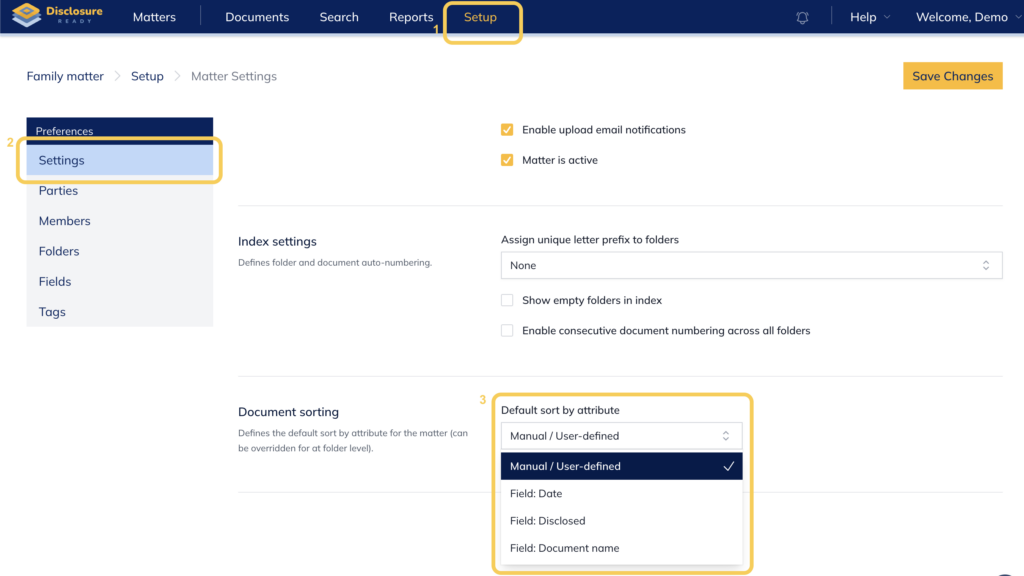
Sorting Documents at the Matter Level #
At the matter level, the selected sorting option determines the default order in which documents appear throughout the entire matter.
The available options are:
- Manual / User-defined
- Field: Date
- Field: Disclosed
- Field: Document name
For Field: Date and Field: Document name, you can also enable Sort in reverse order by selecting the checkbox. This reverses the default order (for example, newest to oldest for dates or Z–A for document names).
This setting establishes the primary document order for the entire matter.
Sorting Documents Within Folders #
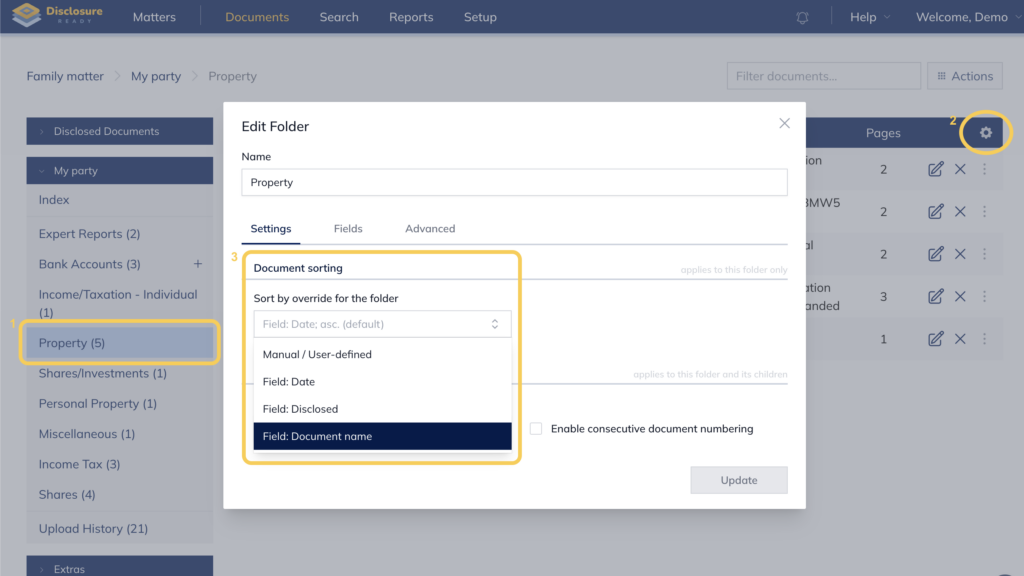
Individual folders can have their own sorting order, separate from the overall matter setting.
You can set the entire matter to sort by Field: Date while still opening individual folders and applying a different sorting option (such as Manual / User-defined, Field: Disclosed, or Field: Document name).
This flexibility allows you to organise specific folders differently depending on the type of documents they contain.
For folders sorted by Field: Date or Field: Document name, you can also select Sort in reverse order to change the direction of the sorting.
Combining Matter and Folder Sorting #
You can combine sorting at the matter level with different sorting preferences inside individual folders.
For example, you may choose to sort the entire matter using Field: Date to maintain a chronological view of documents across the case. When you open a specific folder (such as a folder containing exhibits), you can then apply Field: Document name to organise those documents alphabetically or by numbering.
In disclosure workflows, you may also use Field: Disclosed to group disclosed documents separately while still keeping them alphabetically organised.
This approach allows you to maintain a consistent structure across the matter while still organising individual folders in the way that best suits their contents.
When to Use Each Sorting Option #
Manual / User-defined
Use this option when you want to control the exact order of documents within a folder or matter.
Field: Date
Best used when reviewing documents chronologically, such as correspondence, filings, or document production.
Field: Disclosed
Useful in disclosure workflows where you want disclosed documents to be grouped separately.
Field: Document name
Helpful when documents follow a structured naming convention, such as numbered exhibits or standardised document titles.
Using these sorting options effectively helps maintain a clear and structured document organisation within Disclosure Ready.