
When using the Create Download feature, you have the option to download disclosed documents only.
- Open your matter and click the Actions button
- Click Create Download
- Select PDF file format from the Format dropdown
- Under Included document type, select Disclosed only
- (Optional) Specify a date range
- Click Create
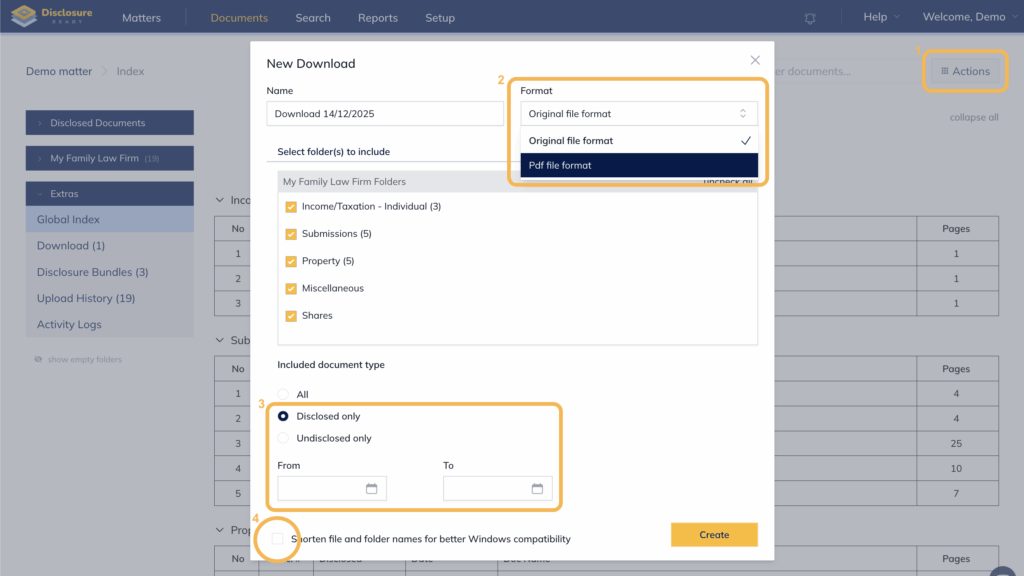
Note: For a clearer folder structure in the generated ZIP file, it is recommended to leave the folder-naming option unchecked unless the file names are particularly long.
Viewing your Downloaded Bundle
You will receive an email confirmation once the bundle has been created.
To access: Go to Documents → Extras → Download.
For further information or assistance, please do not hesitate to reach out to our dedicated Support Team via support@legalready.ai or +61 3 9020 4456.