
You may need to remove an invited party from a member. There are two available options depending on if the invited party has accessed the matter or not. This article will guide you through each steps for either scenario.
How to check if an invited party has accessed the matter
- Open the matter and click Setup
- Click Parties in the left hand menu
- Check the Shield column:
- Shield with a tick = Matter has been accessed
- Shield with an Exclamation mark = Matter has NOT been accessed
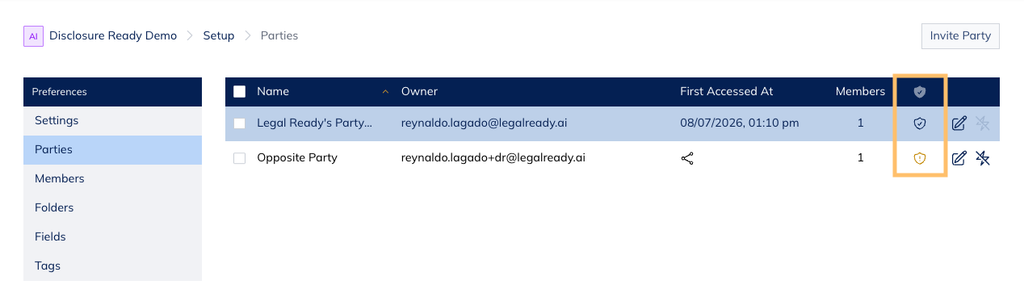
Note: You can also check the First Accessed At column, which shows a date and timestamp once the matter is accessed..
- Follow the instructions below that match the shield displayed
Invited party has not accessed the matter (exclamation mark)
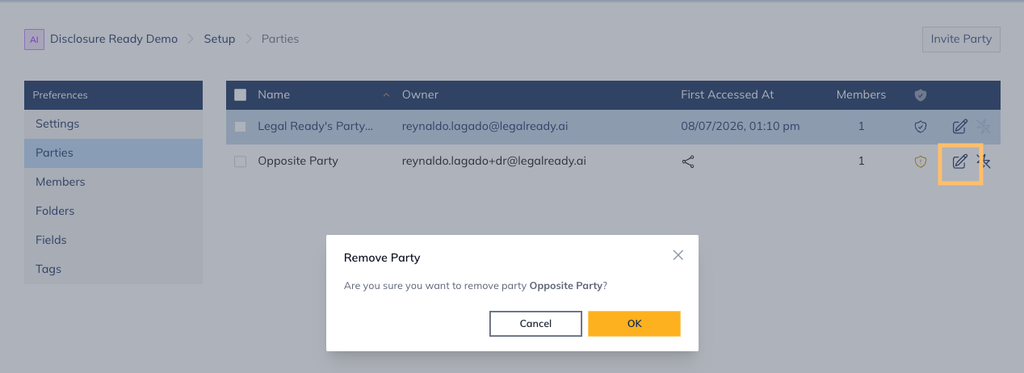
- Click the Disconnect Party from Member
- Click OK to confirm removal
Invited party has accessed the matter (tick)
Once the invited party has accessed the matter, only that party can remove themselves from it. Ask the invited to complete the following steps:
- Log into Disclosure Ready
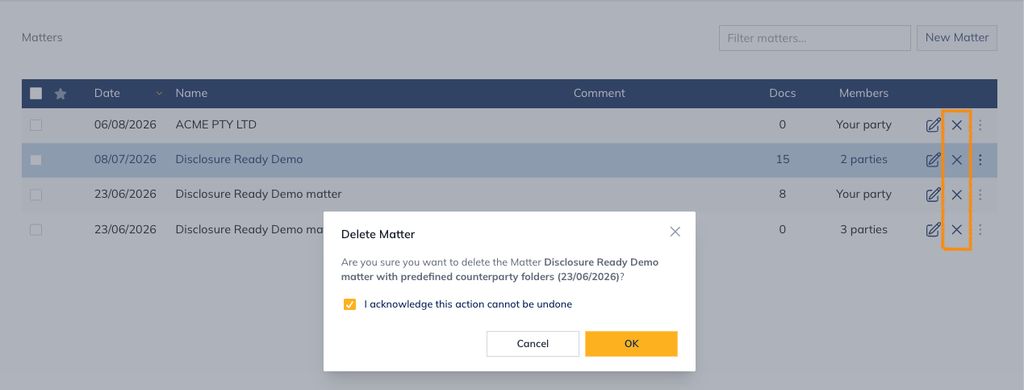
- In the Matters list, locate the relevant matter
- Click the Disconnect & Delete button (cross)
- Tick the acknowledgement message and click OK
For further information or assistance, please do not hesitate to reach out to our dedicated Support Team via support@legalready.ai or +61 3 9020 4456.