
Smart Classification is an AI-powered feature that automatically suggests a document name, date, and destination folder for documents you upload. It reduces the time spent manually organising documents after upload.
Watch the following video or refer the instructions below.
Using Smart Classification #
- Open your matter and click Actions in the top right corner of the Documents tab.
- Select Add Documents
- Under Upload to, select Smart Classification from the dropdown
- Drag and drop your documents into the upload area or select them from your computer
- Click Upload
Note: The system will automatically apply Optical Character Recognition (OCR) to your documents during the upload process.
When processing is complete, a notification will appear in the top right corner prompting you to review the suggestions.
Reviewing suggestions #
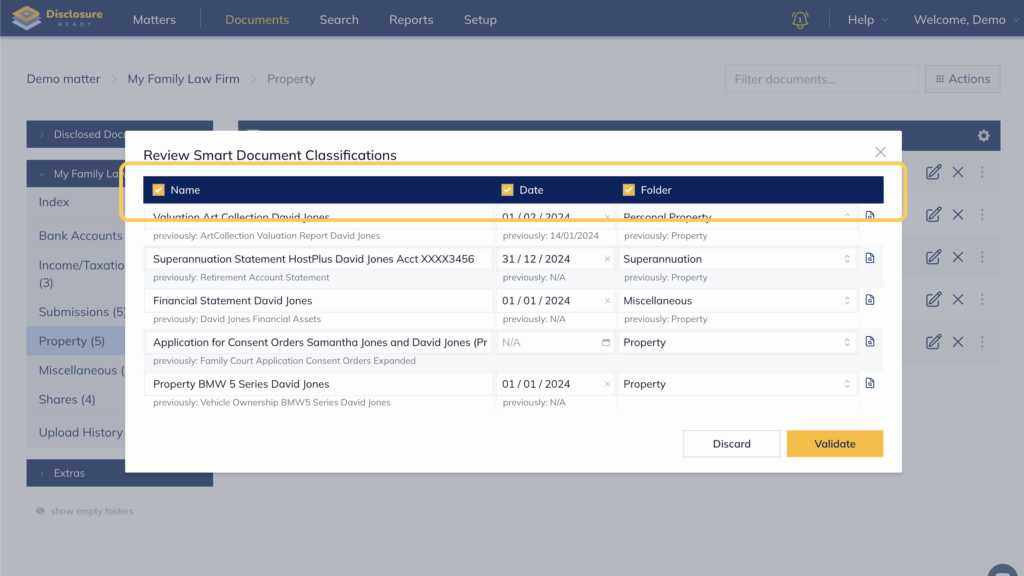
- Click the notification to open the Review Smart Document Classifications panel.
- For each document, you will see a suggested Name, Date and Folder. You can:
- Edit manually — click each field to update the information
- Preview the document — click the document icon on the right to verify the suggestions are accurate
- Accept all suggestions — click Validate
- Reject all suggestions — click Discard
Your documents will be updated and placed in the correct folders automatically.
Bulk selecting or unselecting suggestions
When reviewing suggestions, you can choose to accept or reject suggestions by column rather than document by document. Tick or untick the Name, Date or Folder checkbox in the header row to select or unselect all suggestions in that column.
For example, unticking the Name column will keep the original file names for all documents while still accepting the Date and Folder suggestions.
For further information or assistance, please do not hesitate to reach out to our dedicated Support Team via support@legalready.ai or +61 3 9020 4456.