
You can download documents from your Disclosure Ready matters at any time.
Creating a download #
- Go to your matter and click Actions in the top right corner
- Select Create Download from the dropdown menu

- In the New Download window:
- Enter a name for the download
- Select the format — Original file format or PDF file format
- Select the folders you want to include
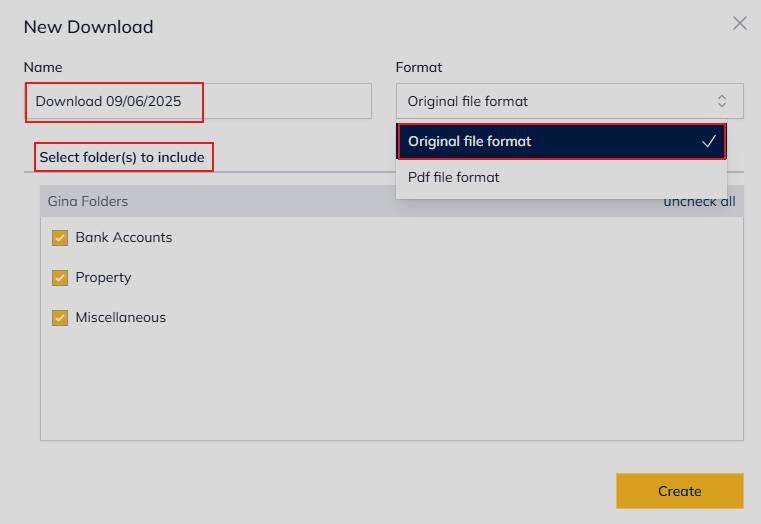
- Click Create – you will be notified by email once the download is ready
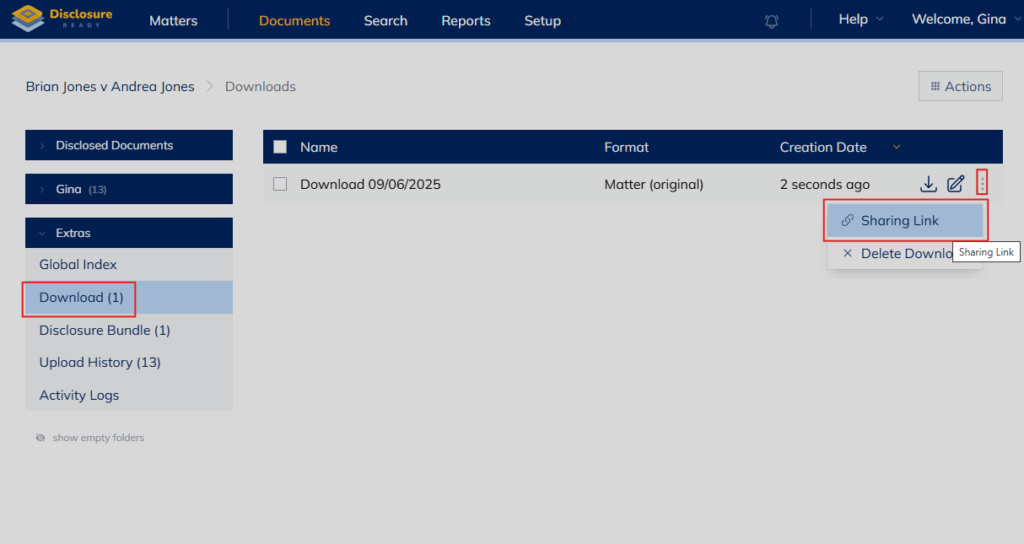
Note: Completed downloads are available in the Download section under Extras in the left-hand panel.
Sharing a download #
You can also share a completed download via a sharing link:
- Go to Extras → Download
- Find the download you want to share and click the three dots on the right-hand side
- Select Sharing Link
- In the Enter an email field, type in the email(s) of all recipient(s), then click the + icon to add
- Click Create – a sharing link will be created
- Click the clipboard on the right side to copy the URL
For further information or assistance, please do not hesitate to reach out to our dedicated Support Team via support@legalready.ai or +61 3 9020 4456.